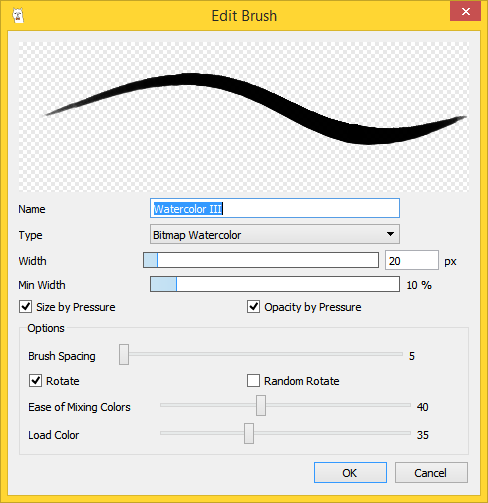
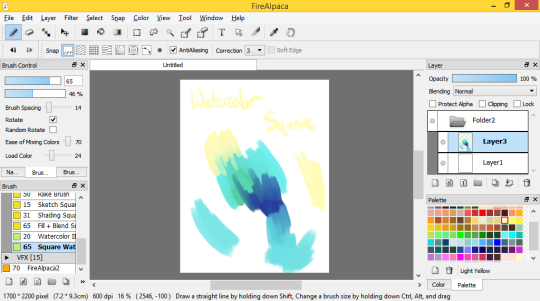
Want to make this brush? Just make a perfect circle and save it (I call mine “round”) and use it as the bitmap, and copy the settings above. It works pretty nicely 😀
aHHHH HOLY SHIT WHEN DID THIS POST START TRENDING?!
*If English is not your native language, you can download it in other languages.
Please download from the official FireAlpaca websites, because a friend of mine simply googled FireAlpaca and downloaded from some random site, and she got malware! So PLEASE be careful.
FireAlpaca has a suggestion/bug reporting box on their site so you can request features, or let them know if you’re having any issues! Also FireAlpaca works fantastically on Mac computers! (though I will say the only time FA has crashed on me is when I used a Mac, so PLEASE save your work often)
Also, please visit these tumblrs if you do get into using FireAlpaca:
Greatly prefer Skype, as it allows me plenty more options than in-game (like catching up on my phone or getting some leveling in while waiting for emotes). I wasn’t sure about Skype at first, but boy am I a convert now. And Tumblr, cripes, Tumblr is my least favorite RP venue. Great for writing, terrible for back and forth RP.
Skype is good if you don’t have much attachments to your RPs, but it’s terrible if you’re worried about losing things. Skype automatically deletes your chat history after ~6 months and renders all that hard work you and your partner did gone forever. @doublethickcustard and I lost a lot of stuff we wrote before we started doing things our current way 🙁
The solution? Google Drive. Google Drive is an absolutely AMAZING program that lets you share a single document with multiple people, mutually edit, and take turns writing your entries. It also has its own in-window chat system, a more comprehensive spellcheck function, and it’s 100% free with absolutely no downloads whatsoever. Furthermore, it instantaneously saves every single edit you make, letter-by-letter, and allows you to use it in offline mode in case you can’t access the internet.
If you have a gmail account, you automatically have a drive account set up and ready to go. You just need to go to drive.google.com.
It’s not just text docs, also. Drive is basically a Microsoft suite without any of the payments. You can use it for powerpoints, excel docs, slideshows, and even legal documents. It also comes automatically attached with a function allowing you to download all of your content as a .pdf. Overall, it’s the best program I’ve ever used for RPing and writing. The formatting for text docs is just as good as Microsoft Word, too!
Granted, yes. If saving stuff is important, a document back-up is awesome. The RPs that are super important to me and I want perpetual access to get not just saved in GDocs but formatted with bookmark links to jump to each scene and organized chronologically so they mostly tell a story and sometimes even the silly OOC convo gets saved for later reference.
I might be a bit obsessively organized. >.>
But as a venue of itself for RP, I’m really awful at remembering to look at my GDocs for updates from writing partners.
Skype only keeps 6 months of history on their servers. I can go back to skype logs from at least 2011 on this computer because I’m hella lazy and just migrate everything every time I get a new computer.